

在机器人对话中使用轮播
即将推出的功能:Genesys 数字机器人连接器
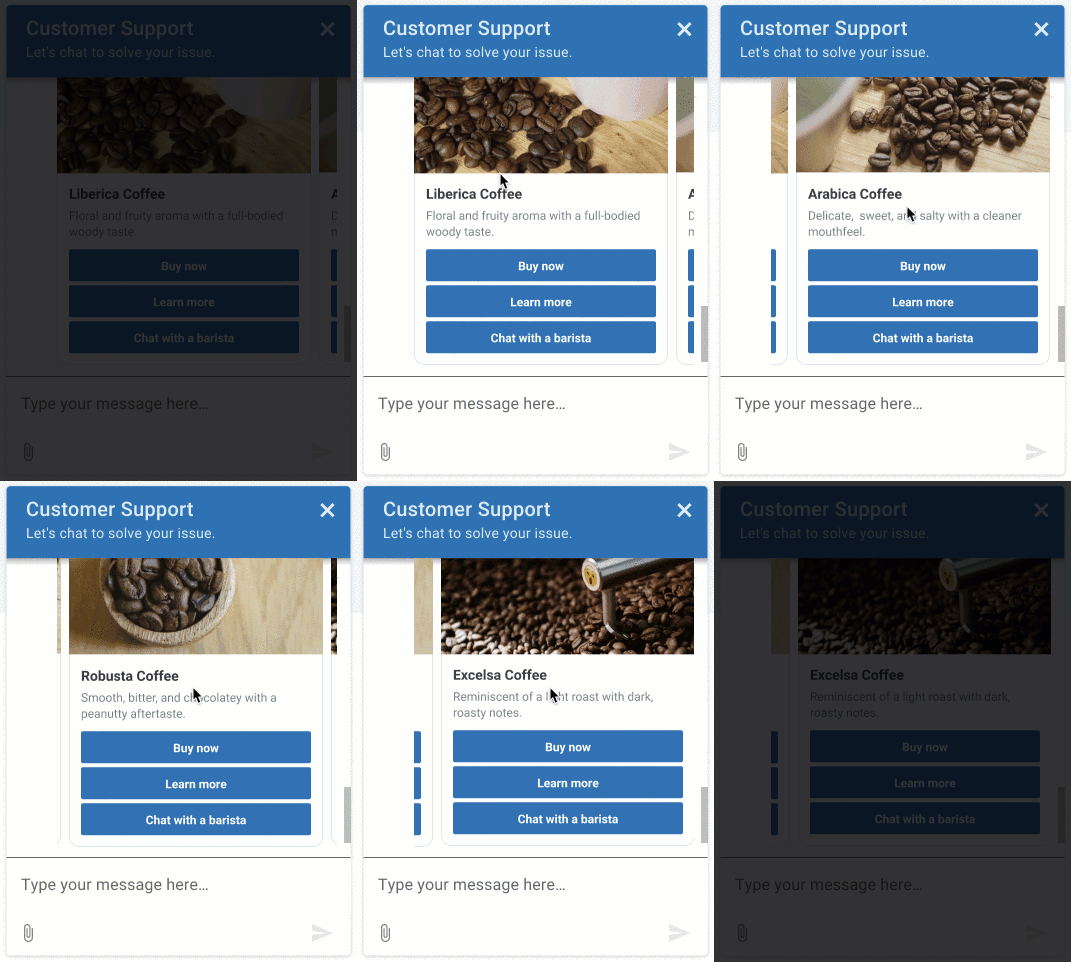
轮播是包含一系列卡片的机器人回复。 要与轮播互动,客户可以滚动浏览卡片选项,然后使用与卡片关联的按钮选择一个选项。
轮播通过提供具有自动化体验的高级选项和操作来促进机器人对话。 Carousels 通过展示一系列卡片,包括描述、图像、标题、文本以及可选的外部网站推荐,为客户提供了一套复杂的选项。 有关卡片的更多信息,请参阅在机器人对话中使用卡片。
示例 Genesys Web Messenger 中的轮播
机器人和渠道支持
目前支持的机器人:
- Genesys 数字机器人流程
- Google Dialogflow
- Google Dialog Flow CX
- 数字机器人连接器
- Bot Connector
目前支持的机器人:
- Genesys Web 消息传递
- Facebook Messenger
- WhatsApp Messenger
- 笔记:在 Open Messaging 中使用此功能之前,您必须先创建一个配置文件并选择适当的 Carousels 消息类型。然后,将其分配给您的开放消息传递集成。有关详细信息,请参阅创建并分配配置文件。开放消息
轮播实施的限制
当你在机器人回复中设计和实现轮播结构时,请考虑以下限制:
- 你可以在单个轮播中实现最多 10 张牌。
- 您在卡片结构中的按钮上配置的有效负载在轮播中的所有卡片中必须是唯一的。
- Twitter 和 WhatsApp 不支持轮播结构。
- 亚马逊 Lex V1 将自定义 JSON 限制为 1000 个字符。 如果您必须使用超过 1000 个字符来创建轮播,则此限制可能会影响实现。
- WhatsApp、LINE 或 Twitter 不支持默认操作。 如果在这些应用程序中配置默认操作,则应用程序将忽略它们。
仅限谷歌 DialogFlow ES:
这些部分描述了如何将轮播整合到你的 Google Dialogflow ES 或 CX 机器人中,并包括用例示例和其他资源。
- 安装来自 Genesys AppFoundry 的谷歌对话流集成。
- 配置谷歌 Dialogflow 平台服务帐号凭据。
- 启用谷歌对话流集成。
- 要在 Dialogflow 控制台中设置轮播,请使用此自定义 JSON 来定义符合机器人意图的卡片选项。 使用多个卡片结构创建轮播。
{
   "genesys_prompt": "String", // optional message text
   "genesys_carousel": [
        {
             "title": "String", // mandatory text to show in the title
             "description": "String", // optional text to show in the description
             "image": "URL", // optional URL of an image
             "defaultAction":  { // optional default button action
                   "type": "String", // Describes the type of action. Valid values Link Postback
                   "text": "String", // The response text from the button click
                   "payload": "String", // Text to be returned as the payload from a ButtonResponse when a button is clicked. The payload and text are a combination which will have to be unique across each card and carousel in order to determine which button was clicked in that card or carousel.
                   "url": "String" // A URL of a web page to direct the user to.
             },
             "actions": [
                   {
                        "type": "String", // Describes the type of action.  Valid values Link Postback
                        "text": "String", // The response text from the button click
                        "payload": "String" // Text to be returned as the payload from a ButtonResponse when a button is clicked. The payload and text are a combination which will have to be unique across each card and carousel in order to determine which button was clicked in that card or carousel.
                   },
                   {
                        "type": "String", // Describes the type of action.  Valid values Link Postback
                        "text": "String", // The response text from the button click
                        "url": "String" // A URL of a web page to direct the user to.
                   }
             ]
        }
   ]
}
要使用轮播选项在机器人的意图之间切换,请在 Dialogflow 控制台中将上一节中的自定义 JSON 添加到响应输入字段:
谷歌云 DialogFlow ES 示例
点击图片放大。
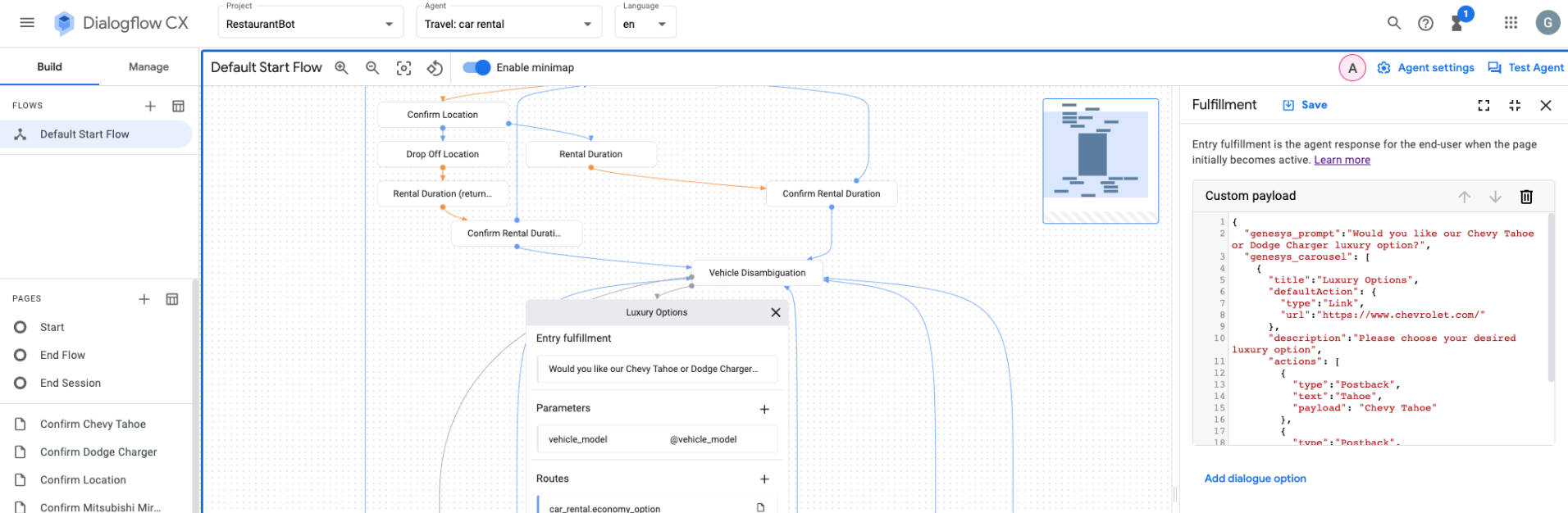
要使用轮播选项来填补机器人的位置,请使用上一节中的自定义 JSON 到 web 挂钩中。 使用多个卡片结构创建轮播。 您也可以为此目的使用 AWS Lambda。 有关更多信息,请参阅 Google Cloud Dialogflow ES 指南中用于填充插槽的 Webhook。
数字机器人连接器
这些部分描述了如何将轮播合并到您的 Genesys Digital Bot Connector 机器人中,并包括其他资源。
- 创建符合 Genesys Digital Bot Connector 规范的机器人。
- 配置 Genesys Digital Bot Connector 集成。
- 使用 Genesys 标准化格式来定义轮播。
    {
      "type": "Structured",
      "content": [
        {
          "contentType": "Carousel",
          "carousel": {
            "cards": [
              {
                "title": "50% off Flights to Norway",
                "description": "Valid September to November only",
                "image": "https://www.samplesite.com/photo/1234.jpg",
                "defaultAction": {
                  "type": "Link",
                  "url": "http://www.samplesite.com/flights/norway"
                },
                "actions": [
                  {
                    "type": "Link",
                    "text": "View Details",
                    "url": "http://www.samplesite.com/flights/norway"
                  },
                  {
                    "type": "Postback",
                    "text": "Book Now",
                    "payload": "I want it"
                  }
                ]
              },
              {
                "title": "35% off Flights to Finland",
                "description": "Valid February to March only",
                "image": "https://www.samplesite.com/photo/5678.jpg",
                "defaultAction": {
                  "type": "Link",
                  "url": "http://www.samplesite.com/flights/finland"
                },
                "actions": [
                  {
                    "type": "Link",
                    "text": "View Details",
                    "url": "http://www.samplesite.com/flights/finland"
                  },
                  {
                    "type": "Postback",
                    "text": "Book Now",
                    "payload": "I want it"
                  }
                ]
              }
            ]
          }
        }
      ]
    }
Bot Connector
这些章节介绍了如何将快速回复整合到 Genesys Bot Connector 机器人中,以及如何包含其他资源。
